Machine Learning Package Experiments
This notebook is a rough documentation of a series of experiments conducted to test my implementations of the following algorithms:
Some of the implemented algorithms have been omitted. A list of the implemented/planned algorithms can be found here
Installing the package
pip install git+https://github.com/jytan17/ML_Package
kNN
Below we have conducted 2 experiments to test our implementation of k nearest neighbours. The datasets used in this section can be downloaded at https://github.com/jytan17/miscellaneous/tree/main/other/data_ml_package_ng
Experiment 1 - Faces Dataset
Let’s define some helper function to load the data and then plot the first 9 faces to see what we are dealing with.
from models.supervised import knnClassifier
import numpy as np
import matplotlib.pyplot as plt
from scipy.io import loadmat
# some helper functions to plot
def loaddata(filename):
    data = loadmat(filename)
    xTr = data["xTr"]; # load in Training data
    yTr = np.round(data["yTr"]); # load in Training labels
    xTe = data["xTe"]; # load in Testing data
    yTe = np.round(data["yTe"]); # load in Testing labels
    return xTr.T,yTr.T.flatten(),xTe.T,yTe.T.flatten()


xTr,yTr,xTe,yTe=loaddata("faces.mat")

imgplot = lambda ax, x : ax.imshow(x.reshape(31, 38).T, cmap=plt.cm.binary_r)

fig, ax = plt.subplots(3, 3)
fig.suptitle("Sample Faces")
samples = np.random.choice(xTr.shape[0], 9).reshape(3,-1)
for i in range(3):
    for j in range(3):
        imgplot(ax[i, j], xTr[samples[i, j]])
        ax[i, j].xaxis.set_visible(False)
        ax[i, j].yaxis.set_visible(False)
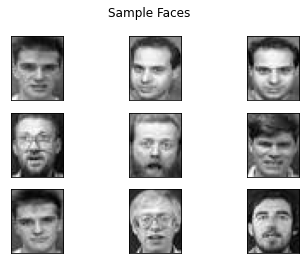
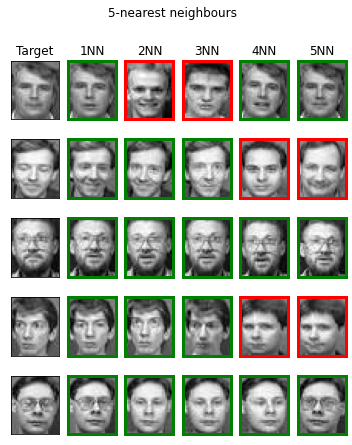
We define another helper function to help us visualize our kNN implementation. This function will take in the model and plot the k nearest neightbours for each target. A green border surrounding the image indicates the picture is off the same person, and the opposite for a red border.
def visualize_knn(model, Xte, yte, img_plotter):
    n = Xte.shape[0]
    k = model.k
    indices, _ = model._findknn(Xte)
    indices = indices.T

    fig, ax = plt.subplots(n, k+1, figsize = (k + 1,n + 2))

    fig.suptitle(f"{k}-nearest neighbours")
    for i in range(n):
        for j in range(k+1):
            if j == 0:
                img_plotter(ax[i, j], Xte[i])
            else:
                img_plotter(ax[i, j], model.Xtr[indices[i, j-1]])

            color = "green" if yte[i] == model.ytr[indices[i, j-1]] else "red"
            if j != 0:
                for spine in ax[i, j].spines.values():
                    spine.set_color(color)
                    spine.set_linewidth(3)

            ax[i,j].yaxis.set_visible(False)
            ax[i,j].xaxis.set_visible(False)

            ax[i, j].set_title("Target") if (i == 0 and j == 0) else None
            ax[i, j].set_title(f"{j}NN") if (i == 0 and j != 0) else None


clf = knnClassifier(5)
clf.fit(xTr, yTr)
clf.score(xTe, yTe, verbose=True)
visualize_knn(clf, xTe[:5], yTe[:5], imgplot)
Error Rate: 13.33 %
Experiment 2 - MNIST
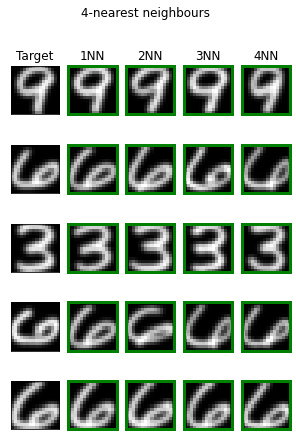
Similar experiment conducted on the MNIST dataset.
xTr,yTr,xTe,yTe=loaddata("digits.mat")

imgplot = lambda ax, x : ax.imshow(x.reshape(16, 16).T, cmap=plt.cm.binary_r)

clf = knnClassifier(4)
clf.fit(xTr, yTr)
clf.score(xTe, yTe, verbose=True)
visualize_knn(clf, xTe[:5], yTe[:5], imgplot)
Error Rate: 5.48 %
CART, Random Forests, and Adaboosted Trees
Below, we have conducted a few experiments to verify the implementations of our Tree algorithms, namely Classification and Regression Tree (CART), Random Forest (an ensemble method consists of CARTs), and Adaboost Trees (boosting with trees).
The dataset for this experiment was handcrafted in order to show the decision boundaries of the models.
from models.supervised import CART, RandomForest, AdaboostTree
import numpy as np
from numpy.matlib import repmat
import matplotlib.pyplot as plt
def gen_spiral_data(N=300):
    "Generate a 2D non-linearly separable dataset"

    r = np.linspace(1,2*np.pi,N)
    xTr1 = np.array([np.sin(2.*r)*r, np.cos(2*r)*r]).T
    xTr2 = np.array([np.sin(2.*r+np.pi)*r, np.cos(2*r+np.pi)*r]).T
    xTr = np.concatenate([xTr1, xTr2], axis=0)
    yTr = np.concatenate([np.ones(N), -1 * np.ones(N)])
    xTr = xTr + np.random.randn(xTr.shape[0], xTr.shape[1])*0.2

    xTe = xTr[::2,:]
    yTe = yTr[::2]
    xTr = xTr[1::2,:]
    yTr = yTr[1::2]

    return xTr,yTr,xTe,yTe

def visualize_tree(model, Xtr, ytr):
    "A helper function to visualise out SVM's solution"
    symbols = ["ko", "kx"]
    marker_symbols = ['o', 'x']
    mycolors = [[0.5, 0.5, 1], [1, 0.5, 0.5]]
    labels = np.unique(ytr)

    res = 300
    x = np.linspace(Xtr[:, 0].min(), Xtr[:, 0].max(), res)
    y = np.linspace(Xtr[:, 1].min(), Xtr[:, 1].max(), res)

    X = repmat(x, res, 1)
    Y = repmat(y, res, 1).T
    Xte = np.array([X.flatten(), Y.flatten()]).T

    preds = model.predict(Xte)
    Z = preds.reshape(res, res)

    plt.contourf(X, Y, np.sign(Z), colors = mycolors)

    for idx, c in enumerate(labels):
        plt.scatter(Xtr[ytr == c, 0],
                    Xtr[ytr == c, 1],
                    marker=marker_symbols[idx],
                    color='k')

    plt.axis('tight')
    plt.show()
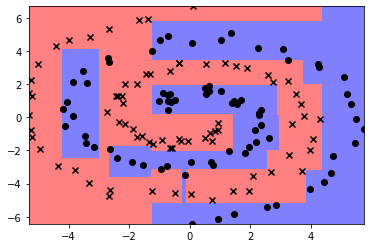
A single tree’s decision boundaries
xTr, yTr, xTe, yTe = gen_spiral_data(150)
cart = CART()
cart.fit(xTr, yTr)
visualize_tree(cart, xTr, yTr)
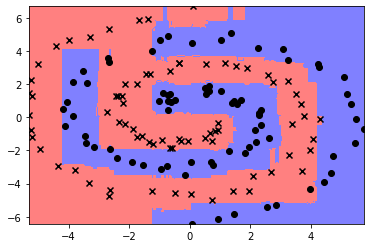
A forest’s decision boundaries
forest = RandomForest(maxiter=30)
forest.fit(xTr, yTr)
visualize_tree(forest, xTr, yTr)
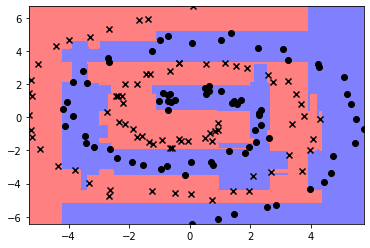
Decision boundary of adaboost
ada = AdaboostTree(maxiter = 100, maxdepth = 3)
ada.fit(xTr, yTr)
visualize_tree(ada, xTr, yTr)
PCA and K means
Experiment 1 - Iris Dataset
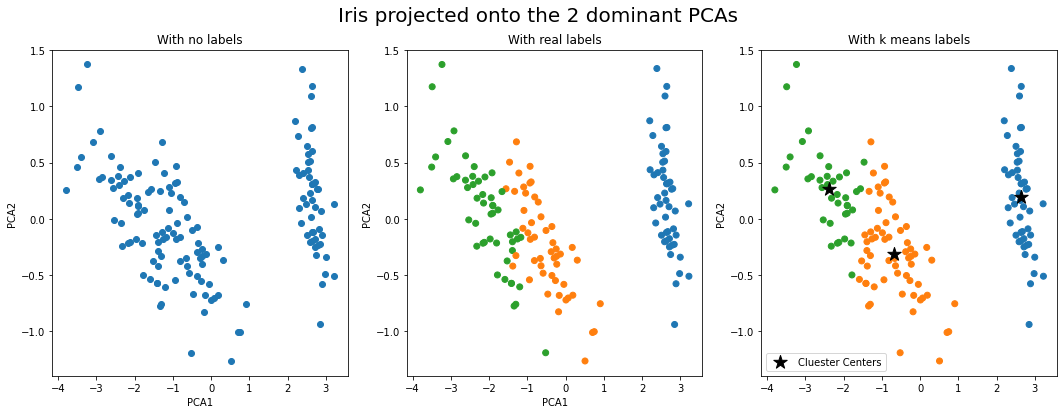
We tested our implementatin of PCA in conjunction with k-means as follows:
- Perform k means on the Iris dataset, which has 4 features
- Perform PCA on the same dataset to obtain the matrix that will allow us to project the 4D data into 2D
- Plot the resuling 2D features of each sample in the training data, and compare the cluser assignment with their real labels.
# import kMeans and PCA from our package
from models.unsupervised import kMeans, PCA
import numpy as np
import matplotlib.pyplot as plt
Load the Iris data (can be downloaded at https://github.com/jytan17/miscellaneous/tree/main/other/data_ml_package_ng)
def load_data():
    data = np.load('iris.npy')
    return data[:,:-1], data[:,-1]

X_iris, y_iris = load_data()
N, data_dim = X_iris.shape
y_iris_colors = np.char.add(np.array(["C"]), y_iris.astype(int).astype(str))
pca = PCA(2)
pca.fit(X_iris)
kmeans = kMeans(3)
kmeans.fit(X_iris)
y_kmeans = kmeans.predict(X_iris)
Y_kmeans_colors = np.char.add(np.array(["C"]), y_kmeans.astype(str))
fig, (ax1, ax2, ax3) = plt.subplots(1, 3, figsize=(18, 6))
fig.suptitle("Iris projected onto the 2 dominant PCAs", fontsize = 20)

Z_iris = pca.transform(X_iris)
ax1.scatter(Z_iris[:, 0], Z_iris[:, 1])
ax1.set_title("With no labels")
ax1.set_ylabel("PCA2"); ax1.set_xlabel("PCA1")

ax2.scatter(Z_iris[:, 0], Z_iris[:, 1], color = y_iris_colors)
ax2.set_title("With real labels")
ax2.set_ylabel("PCA2"); ax2.set_xlabel("PCA1")

pca_centers = pca.transform(kmeans.cluster_centers)
ax3.scatter(Z_iris[:, 0], Z_iris[:, 1], color = Y_kmeans_colors)
a = ax3.scatter(pca_centers[:, 0], pca_centers[:, 1], color = "black", s = 200, marker = "*", label = "Cluester Centers")
ax3.set_title("With k means labels")
ax3.set_ylabel("PCA2"); ax2.set_xlabel("PCA1")
ax3.legend()
<matplotlib.legend.Legend at 0x7f7e35790b90>
Experiment 2 - MNIST
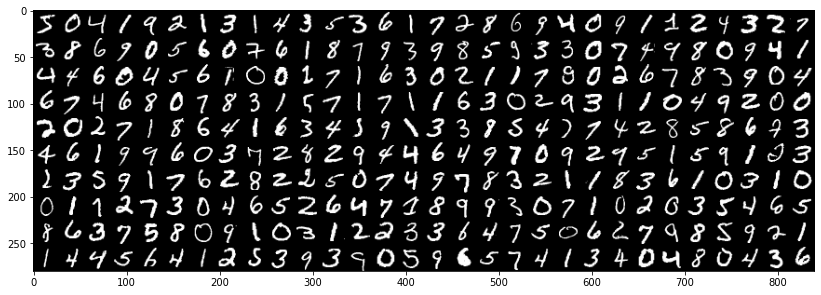
Below, we used PCA to reduce the dimensions of the MNIST (link to dataset)dataset, which has 784 features. This is a helpful preprocessing stage if we want to use k-means clustering as it does not work well with high dimensional data.
Note: this is not considered as a form of feature selection as we are transforming high dimensional data into a lower dimensional space.
MNIST = np.load("mnist.npz")
mnist_images = MNIST['X']

def make_img_grid(images, n_cols=10):
    """ Helper function for arranging images into a grid """
    cols = []
    gap = len(images) % n_cols
    if gap > 0:
        # add padding if needed
        images = np.concatenate((images, np.zeros((n_cols-gap,)+images[0].shape)), 0)
    for n in range(n_cols):
        cols.append(np.concatenate(images[np.arange(n, len(images), step=n_cols)]))
    return np.concatenate(cols, -1)

plt.figure(figsize=(14,7))
plt.imshow(make_img_grid(mnist_images[:300], n_cols=30), cmap='binary_r');
Below is a plot to help us determine how many PCAs we should use for k-means. The visualization shows how much variance each PCA is able to capture, therefore, PCAs with low values may be considered as irrelevant and we can safely neglect them for the next stage.
X_mnist = mnist_images.reshape(-1, 784) # reshape to 2d matrix

x_bar = X_mnist.mean(axis = 0)
X_tilde = X_mnist - x_bar


# this line workds out the pca's of the dataset along with some other values.
u, s, w = np.linalg.svd(X_tilde, full_matrices = False)

N, data_dim = X_mnist.shape
plt.figure(figsize=(12,4))
plt.plot(np.arange(data_dim)+1, s**2 / N, '.-')
plt.axvline(x=20, color = "red")
plt.text(25,2.3,'20', rotation = 90)
plt.xlabel('Component')
plt.ylabel('Explained variance')
Text(0, 0.5, 'Explained variance')
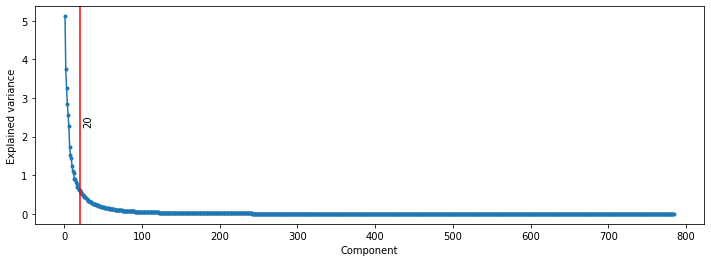
From the table above, we can see that most of the variance can be explained by the first 20 (ish) PCAs. Therefore, we can expect the k-means to do well with around 20 PCAs.
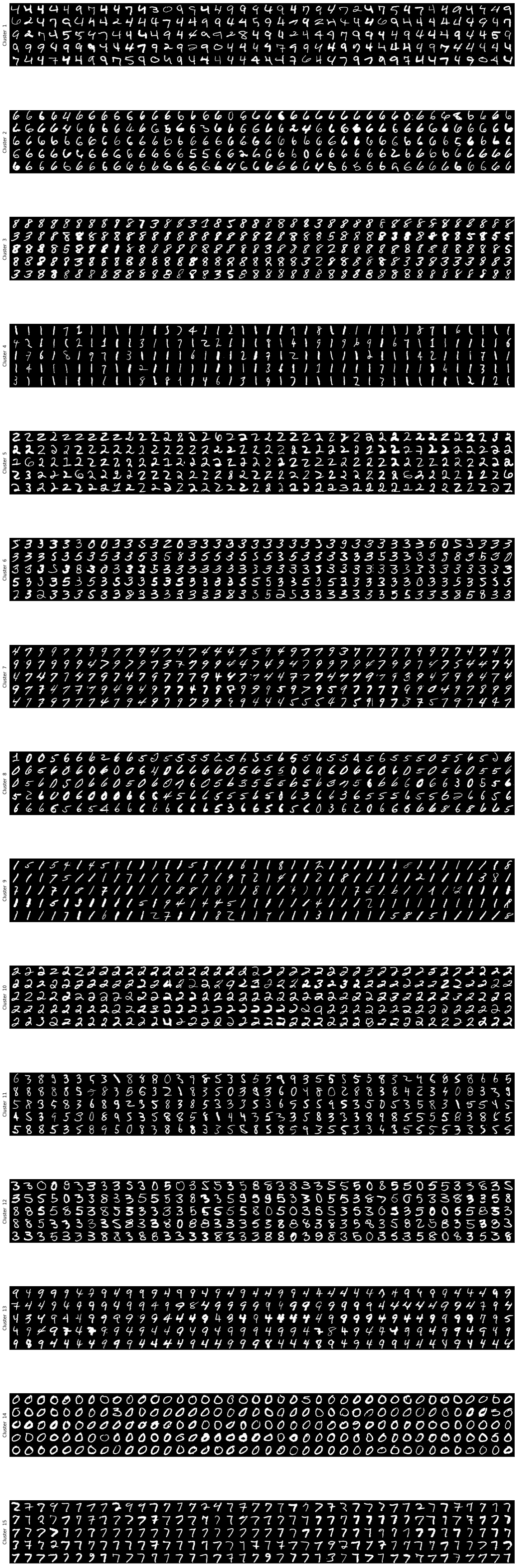
After the orginal 784 features dataset has been reduced to 20 features, we can efficient use this for clustering. Now, we know that there are exactly 10 groups for the MNIST dataset, but we have set k to be 20 here as the exact number of groups are not known for datasets that we actually use k means for.
pca = PCA(20) # use only the first 20 PCA
pca.fit(X_mnist)
X_mnist_pca = pca.transform(X_mnist)

kmeans = kMeans(15) # we will cluster the data into 2 groups
kmeans.fit(X_mnist_pca)
z_mnist = kmeans.predict(X_mnist_pca)
Let us plot the a sample of each cluster to see how well k-means managed to cluster the data with the dimension reduced MNIST dataset.
plt.figure(figsize=(16, 50))
for k in range(15):
    plt.subplot(15, 1, k+1)
    plt.imshow(make_img_grid(mnist_images[z_mnist==k][:200], n_cols=40), cmap='binary_r');
    plt.xticks([])
    plt.yticks([])
    plt.ylabel(f"Cluster  {k+1}")
plt.tight_layout();
Another interesting thing we can do is to plot the mean (center) of each cluster. We first project the 20 dimensional centers back into its original 784 dimension using the inverse pca transform, then plot it as an image.
centers = kmeans.cluster_centers
mu_mnist = pca.inverse_transform(centers)
plt.imshow(make_img_grid(mu_mnist.reshape(15,28,28)), cmap='binary_r');
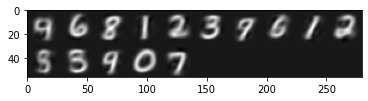
We get the a number for each cluster!
Support Vector Machine
Below, we have generated some artificial datasets to test our implementations of the primal support vector machine (SVM) and kernelised SVM.
There will be two types of data, one linearly separable and another non-linearly separable. In the non-linearly separable case, the primal SVM will fail, thus requiring a more sophisticated technique (kernels) which involves projecting the data into a higher dimension for which the data is linearly separable.
# import the models from our package
from models.supervised import primalSVM, kernelSVM

# import other libraries
import numpy as np
import matplotlib.pyplot as plt
from numpy.matlib import repmat
def gen_linear_data(n=100,b=0.):
    "Generate a 2D linearly separable dataset, i.e. a dataset that can be separated by a line"

    xTr = np.random.randn(n, 2)
    w0 = np.random.rand(2, 1) # this is the separating hyperplane (line)
    yTr = np.sign(np.dot(xTr, w0)+b).flatten() # assign labels to point sin xTr based on their position on the 2D plane w.r.t. the line
    return xTr, yTr

def gen_spiral_data(N=300):
    "Generate a 2D non-linearly separable dataset"

    r = np.linspace(1,2*np.pi,N)
    xTr1 = np.array([np.sin(2.*r)*r, np.cos(2*r)*r]).T
    xTr2 = np.array([np.sin(2.*r+np.pi)*r, np.cos(2*r+np.pi)*r]).T
    xTr = np.concatenate([xTr1, xTr2], axis=0)
    yTr = np.concatenate([np.ones(N), -1 * np.ones(N)])
    xTr = xTr + np.random.randn(xTr.shape[0], xTr.shape[1])*0.2

    xTe = xTr[::2,:]
    yTe = yTr[::2]
    xTr = xTr[1::2,:]
    yTr = yTr[1::2]

    return xTr,yTr,xTe,yTe

def visualize_svm(model, arrow = True):
    "A helper function to visualise out SVM's solution"

    Xtr, ytr = model.xTr, model.yTr
    symbols = ["ko", "kx"]
    marker_symbols = ['o', 'x']
    mycolors = [[0.5, 0.5, 1], [1, 0.5, 0.5]]
    labels = np.unique(ytr)

    res = 300
    x = np.linspace(Xtr[:, 0].min(), Xtr[:, 0].max(), res)
    y = np.linspace(Xtr[:, 1].min(), Xtr[:, 1].max(), res)

    X = repmat(x, res, 1)
    Y = repmat(y, res, 1).T
    Xte = np.array([X.flatten(), Y.flatten()]).T

    preds = model.predict(Xte)
    Z = preds.reshape(res, res)

    plt.contourf(X, Y, np.sign(Z), colors = mycolors)

    for idx, c in enumerate(labels):
        plt.scatter(Xtr[ytr == c, 0],
                    Xtr[ytr == c, 1],
                    marker=marker_symbols[idx],
                    color='k')

    if arrow:
        w, b = model.coef_, model.intercept_

        alpha = - 1 * b / (w**2).sum()
        plt.quiver(
            w[0]*alpha,
            w[1]*alpha,
            w[0],
            w[1],
            linewidth=2,
            color=[0,1,0]
            )

    plt.axis('tight')
    plt.show()
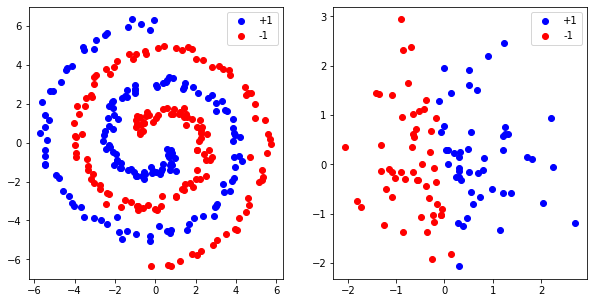
As you can see, the plot on the right looks separable by a straight line but the spiral dataset (left) is not.
fig, (ax1, ax2) = plt.subplots(1, 2, figsize = (10, 5))

xTr1,yTr1,xTe1,yTe1=gen_spiral_data()
xTr2,yTr2 = gen_linear_data()
ax1.scatter(xTr1[yTr1 == 1, 0], xTr1[yTr1 == 1, 1], c='b')
ax1.scatter(xTr1[yTr1 != 1, 0], xTr1[yTr1 != 1, 1], c='r')
ax1.legend(["+1","-1"])

ax2.scatter(xTr2[yTr2 == 1, 0], xTr2[yTr2 == 1, 1], c='b')
ax2.scatter(xTr2[yTr2 != 1, 0], xTr2[yTr2 != 1, 1], c='r')
ax2.legend(["+1", "-1"])
<matplotlib.legend.Legend at 0x7f7e35a69e10>
Primal SVM
clf2 = primalSVM(C=10)
clf2.fit(xTr2, yTr2)
visualize_svm(clf2)
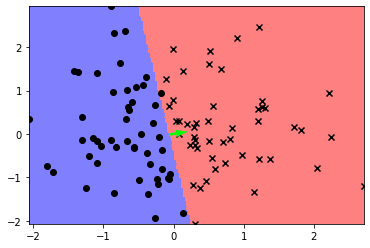
Primal SVM is unable to capture non linear patterns
clf1= primalSVM(C=10)
clf1.fit(xTr1, yTr1)
visualize_svm(clf1)
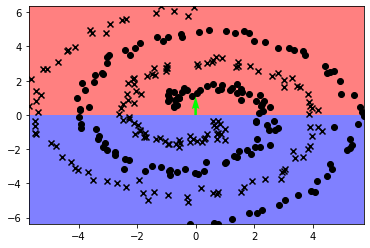
In this case, we can use a kernelised SVM (only the rbf kernel is supported now).
clf1= kernelSVM(10, "rbf", 1)
clf1.fit(xTr1, yTr1)
visualize_svm(clf1, False)
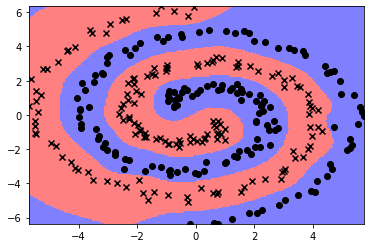
Furthermore, we can also use the kernelised SVM on the linearly separable data!
clf2= kernelSVM(10, "rbf", 1)
clf2.fit(xTr2, yTr2)
visualize_svm(clf2, False)
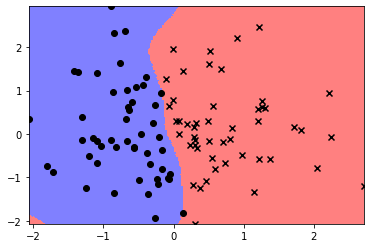
Feedforward Network
Below, we have tested our implementation of a basic feed forward neural network on the MNIST dataset.
The mnist dataset is taken from the “sample_data” on google colab. Thus, running this section on google colab will automatically load the data. However, if you want to run this locally, please download the data from Colab.
We first preprocessed the data by one hot encoding the labels and normalizing the data.
import pandas as pd
from sklearn.preprocessing import OneHotEncoder, Normalizer
from sklearn.model_selection import train_test_split

mnist = pd.read_csv("/content/sample_data/mnist_train_small.csv").values
X, y = mnist[:, 1:], mnist[:, 0]

ohe = OneHotEncoder()
ohe.fit(y.reshape(-1, 1))
normalizer = Normalizer()
normalizer.fit(X)
X = normalizer.transform(X)
y = ohe.transform(y.reshape(-1, 1)).toarray()

Xtr, Xte, ytr, yte = train_test_split(X, y, test_size = .2)
Xtr, Xva, ytr, yva = train_test_split(Xtr, ytr, test_size=.1)
We trained the network for 30 epochs with a mini batch size of 50 and a learning rate of 3. After one, epoch the model was able to predict 90% of the samples correctly from the validatin dataset.
from models.supervised import FeedForward
net = FeedForward([784, 30, 10])
net.fit(Xtr, ytr, 30, 10, 3.0, Xva, yva)
print("Predictions:",net.predict(Xte),"\nTruth labels:",ohe.inverse_transform(yte).flatten())
Epoch 0 validation acc. 1358 / 1600
Epoch 1 validation acc. 1415 / 1600
Epoch 2 validation acc. 1439 / 1600
Epoch 3 validation acc. 1452 / 1600
Epoch 4 validation acc. 1463 / 1600
Epoch 5 validation acc. 1464 / 1600
Epoch 6 validation acc. 1466 / 1600
Epoch 7 validation acc. 1467 / 1600
Epoch 8 validation acc. 1483 / 1600
Epoch 9 validation acc. 1471 / 1600
Epoch 10 validation acc. 1480 / 1600
Epoch 11 validation acc. 1485 / 1600
Epoch 12 validation acc. 1495 / 1600
Epoch 13 validation acc. 1493 / 1600
Epoch 14 validation acc. 1488 / 1600
Epoch 15 validation acc. 1492 / 1600
Epoch 16 validation acc. 1497 / 1600
Epoch 17 validation acc. 1501 / 1600
Epoch 18 validation acc. 1500 / 1600
Epoch 19 validation acc. 1499 / 1600
Epoch 20 validation acc. 1497 / 1600
Epoch 21 validation acc. 1498 / 1600
Epoch 22 validation acc. 1500 / 1600
Epoch 23 validation acc. 1503 / 1600
Epoch 24 validation acc. 1498 / 1600
Epoch 25 validation acc. 1495 / 1600
Epoch 26 validation acc. 1514 / 1600
Epoch 27 validation acc. 1506 / 1600
Epoch 28 validation acc. 1508 / 1600
Epoch 29 validation acc. 1512 / 1600
Predictions: [1 1 1 ... 7 9 0]
Truth labels: [1 1 1 ... 7 9 0]